
When I started sharing this blog 7 years ago, Mediavine was the gold standard ad network, the one most bloggers strove towards. They seemed to have the least annoying ads, the best customer service and the highest revenue.
At that time, Mediavine required 25,000 sessions/month to join, which for my site is about 50,000 pageviews/month. Those numbers might as well have been in the zillions when I started out, so I noted Mediavine’s existence, and went back to writing the way I always have.
That involves ignoring things like SEO and trending topics in order to keep this blog writing thing a fun hobby that I did without monetizing it in any way for years. But then something interesting happened 🙂 .
The Worst Timing
I actually hit Mediavine’s 25,000 session requirement in the summer of 2020 – the exact month that they DOUBLED their requirements to 50,000 sessions/month or about 100,000 pageviews for me. I thought that first goal was impossible and it took years of consistency and luck to reach, but this new goal was truly an Everest I wasn’t going to attempt to climb.
A New Option
So I stuck with my ad network at the time (Monumetric, which requires 10,000 pageviews/month) and forgot about Mediavine. Fast forward to November 2024. I had been receiving helpful notes from readers that my website was jumping around for them on mobile devices and I couldn’t for the life of me figure out how to stop that annoying bug.
I even roped in my web dev partner to help and after going through everything we both could think of, we landed on the possibility that it was my ad network Monumetric and how they collapse unused ad space. My main goal is to have a great reading experience for y’all and I added ads to my site to ideally cover the cost of running the website, but if that revenue source was causing a worse experience, it was time to cut the cord.
I drafted an email to Monumetric to terminate my partnership with them and just in case, started searching the internet to see if there was any other ad network that people recommended, that I qualify for, and that hadn’t reported these page jumping issues. Enter Journey By Mediavine.
Journey By Mediavine
I guess this is the downside of me not being in the content creator space or even really personal finance circles anymore. I had no idea that in March 2024, Mediavine had launched Journey, an offshoot of their main ad network specifically for smaller websites.
It has the requirement of 10,000 sessions/month or about 20,000 pageviews for my site, which wasn’t a problem. One positive about me being behind the curve is that there were 8 months of people posting their experiences with this ad network and nowhere did I see any tech issues like the ones I was experiencing.
In fact, it looked like Journey was just built on the same ad platform as regular Mediavine, so it also had their gold standard ad tech. I read about the experiences of the 4,000 bloggers who had already joined this new network, and decided to throw my hat in the ring. So I put away my draft termination email (for now) and applied to Journey.
Application
Like always, I’m going to get into the nitty gritty of this process to help others know what to expect and avoid my mistakes. So strap in.

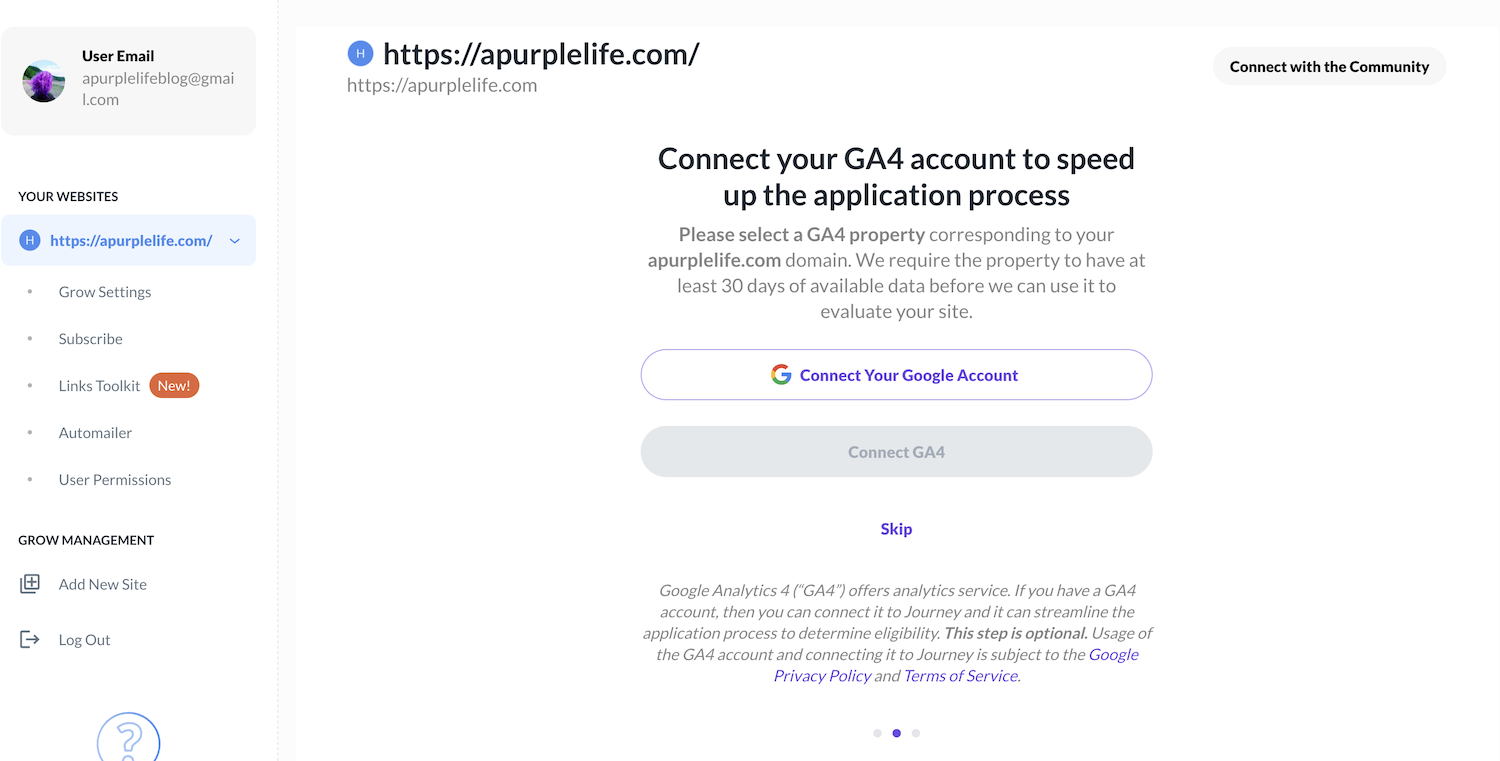
I went to the Journey website and started filling out its queries, but when I got to the analytics part, the button to connect my Google Analytics was greyed out. However, I was able to continue with my application by clicking “Skip”.
One required field in the application is a link to an “About Me” page on your website. I don’t have that exactly since my “About Me” is just a sidebar on every page, so I linked to my “Start Here” page instead and that didn’t seem to be a problem. I submitted my application.
The Grow Plugin
As part of the application process, Journey has you add their Grow Plugin to your website. Since I use WordPress, adding it was a very simple process.
I just searched for “Grow” in the Plugin library and installed it. However, after I installed it I noticed that it had automatically added things to my site and pushed them live, such as a giant subscribe button every few paragraphs, which is not cool! It wasn’t clear this would happen before I installed it.
So I went through each option in the Journey/Grow dashboard, turning off all of that stuff. Curiously it was easier to do this on their dashboard than in the Plugin itself by going to Grow Settings>Recommended Features>Spotlight Subscribe>Update Settings and Disabling that subscribe “feature.”

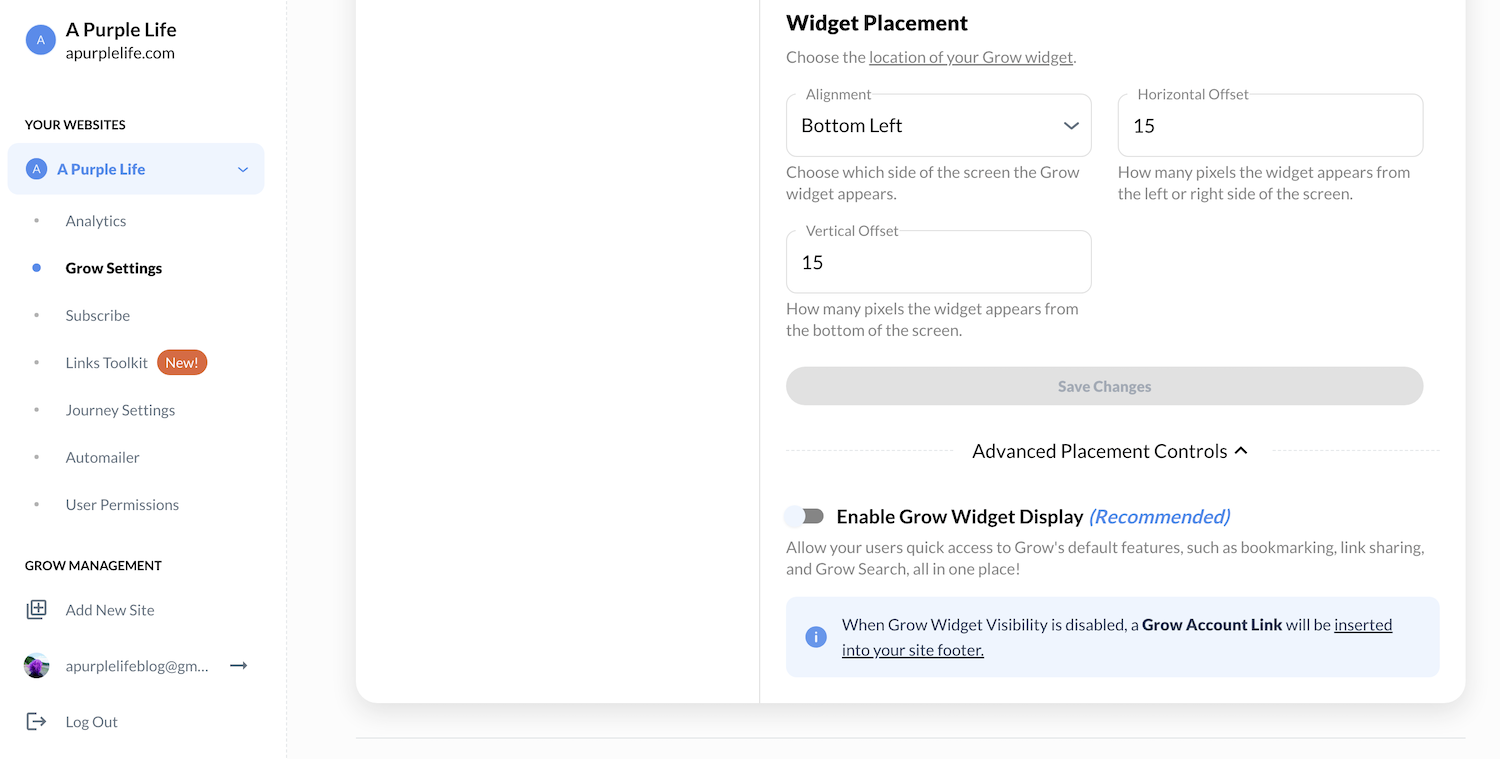
Another thing that was automatically added was a Grow Widget to the bottom right of every page. I was able to turn that off from the Grow Dashboard by going to Grow Settings>Appearance and then scrolling to the bottom where there’s a hidden section called “Advanced Placement Controls” where you can turn off “Enable Grow Widget Display” to disable the whole widget instead of just parts of it.
However, once I figured all that out it was fairly easy to turn these things I didn’t want off and the changes were implemented immediately. Hard refresh is your friend – on my Mac I do that by clicking Command (⌘) and Shift and then pressing R.
I would have appreciated a heads up from Journey that all of this would happen and ideally, I wish that the Grow Plugin wouldn’t automatically push things live to my website without my approval.
Anyway, once I wrangled the Grow Plugin to not have any pop ups I find annoying, I waited to see if Journey would approve me.
Approval
Journey says that they require 30 days of the Grow Plugin info gathering on a website before they make a decision, and I had read from other Journey applicants on reddit that some of them were waiting months to hear back.
However, on December 10th, 14 days after I submitted my application, I got the email: I was approved for Journey By Mediavine!

After receiving this email, I immediately sent Monumetric an email that I’d already drafted saying “See ya!”
Leaving Monumetric
Journey has mentioned in forum posts that their invite to join Journey doesn’t expire because they know people have agreements with other ad networks that need to end before they can join. I was happy to not have a deadline looming because leaving Monumetric was a bit of a process that showed one of the reasons why I was leaving.
After describing my frustrations with Monumetric even outside their ads making my page jump on Apple products, my Partner said it seems we “philosophically disagree” and that’s completely true. I became increasingly frustrated with them continuing to ignore my wishes and go over my head to change my website without permission. They would always say they were trying to “make me more money”…but I’ve always been clear that making money is at the bottom of my priority list while things like reader experience are way more important.
Anyway, here’s what happened. I emailed Monumetric the below.
I’m leaving Monumetric. I know there is a 30 day window until your ads and code can be removed from my site so please let me know if you need anything from me and if there are any other next steps.
Purple
They replied asking for me to reveal my plans for the future and asking if they could have control of my ads to make me more money to try and make me change my mind. As I’ve said to them countless times, I do not want more ads on my site.
Revenue is not important to me so I don’t know why they would think that’s what I want now. I emailed them explaining this once again and reiterating that I was leaving.
They replied confirming that my 30 day notice would end on January 8th and that if I didn’t comply with that date there would be an early termination fee, which would be a portion of my ad income from the previous 60 days. Wow.
Of course they would nickel and dime me if I remove their ads a second before 30 days are up 🙂 . Ugh – the whole experience just left a bad taste in my mouth.
Implementation
So then I waited for 30 days to be up. Luckily it was the holiday season and I had family gatherings and PurpleMas to distract me 😉 .
Removing Monumetric
On January 9th it was finally time to remove Monumetric’s ads and implement Journey’s. I removed the Monumetric Plugin from my WordPress site and removed the Ad Inserter Plugin they had installed (which I learned to do from a Journey forum and was not something Monumetric told me to do).
I then cleared my site’s cache by going to my WP Super Cache Plugin and under “Delete Cached Pages” clicked “Delete Cache.” I then opened an Incognito window and hard refreshed my browser. However when I checked, I still saw some of Monumetric’s ads on my site.
So I did some digging and discovered that they had added their code to random parts of my website that I had to remove manually – *sigh* wonderful. They had inserted code into separate Ad Inserter Sidebar Sections and I manually removed them by going to Appearance>Customize>Widgets>Sidebar and deleting the code there.
Implementing Journey
Once all the Monumetric stuff was done, this process was wonderfully straightforward and detailed here 🙂 . Basically all I had to do was go to the Journey/Grow Dashboard and click “Finish Onboarding.”
The site had me read and accept their terms of service and then enter my business info. I then clicked “Enable Ads Script” and it took me to the Grow Plugin in my WordPress where I clicked “Enable.” To make sure all was well, I had to clear my site’s cache again just in case. And that was it!
The ad script was live on my site. After that, I went through the rest of the onboarding process on the Journey Dashboard which involved making sure I had an acceptable Privacy Policy (I did 🙂 ) and adding my payment information through a company I hadn’t heard of before called Tipalti.
The only weird thing that happened during set up was that after I entered my bank payment details, Tipalti opened a terms and conditions page that I had to agree to. However, after I read the terms I saw no exit button or way to continue. I ended up pressing “Esc” on my laptop and the terms left the screen to reveal a “Next” button. So that was strange, but I figured it out.
Once all that was done I received this message:
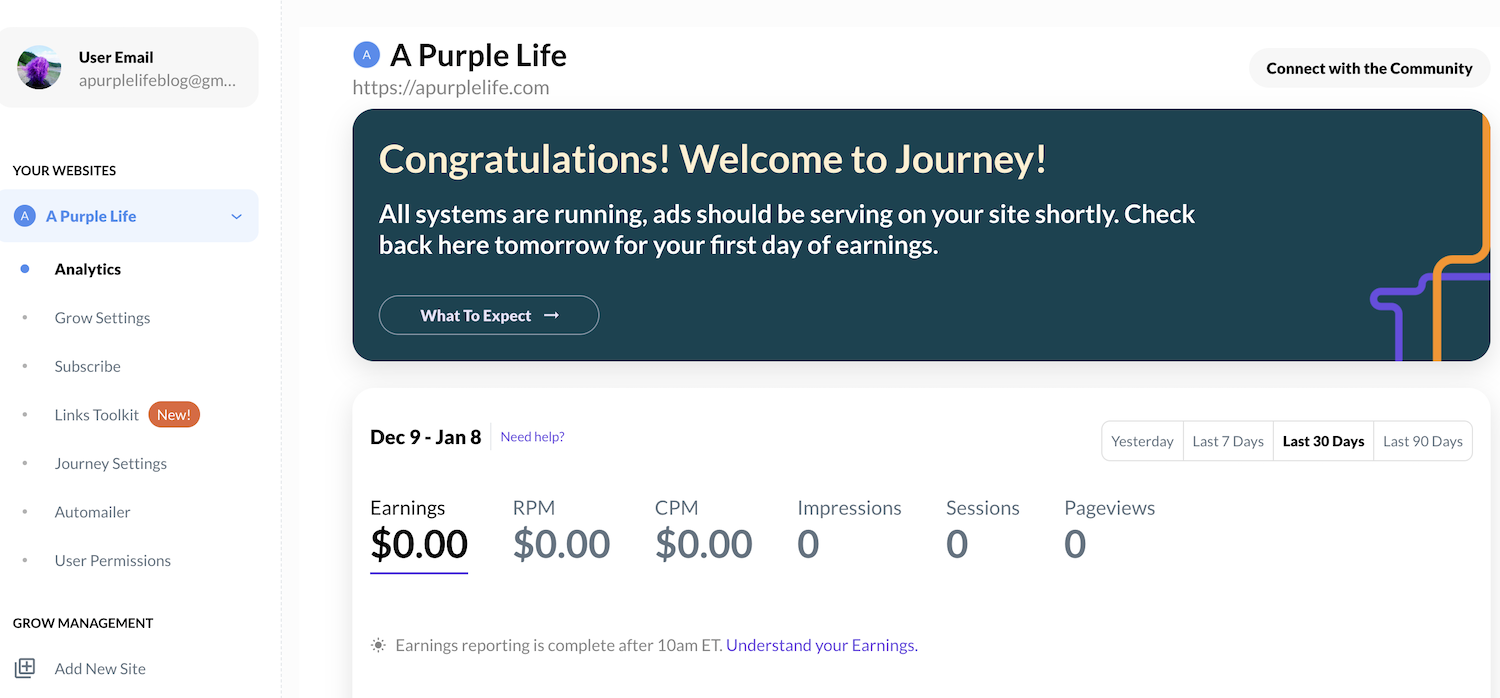
Curiously, when I clicked the link to “What To Expect,” it just talked about RPMs 🙂 . I was fully done with this setup process in about 20 minutes and that included checking and testing a million things on my site just because I’m neurotic like that 🙂 .
For a more chill person, this process could take minutes, which I am very impressed by. This process was literally night and day to the hair pulling, migraine inducing implementation of Monumetric’s ads. They were the first ad network I worked with so I didn’t know it wasn’t always like that 🙂 .
Optimizations
After all of the implementation was over, I took the time to explore the rest of the Journey Dashboard and was surprised to see that under “Journey Settings,” I could change the Ad Density settings on my site.
On forums I had seen that Journey doesn’t allow us access to our ad density for 30 days and keeps it at “Optimal” as their programmatic ads get used to your site. But I had access to that right away – nice!
I even tested it by lowering my ad density and the change was implemented immediately on my site. Wonderful 🙂 .

Also, since I read basically all of the Journey forums, I saw that there’s a trick for how to see what other people are seeing on your site since it’ll look different for the site authors who are there all the time because they’re programmatic ads. You add “?test=outstream” to the end of a page’s URL like this: http://apurplelife.com/?test=outstream
I appreciated that tip so I could make sure things looked good for others besides myself. I also appreciated that Journey did not put ads in the content of any of my Pages, such as Start Here or The Numbers.
However, if they had done that, I was prepared 🙂 . I learned from another forum post how to block ads on specific pages and how to remove ads from specific sections with divs.
I also saw this tip about lazy-loading plugins on the forums:
“If you are using a lazy-loading plugin, make sure the plugin is set to ONLY lazy load images and NOT iFrames and other embed types. We already lazy-load our ads so lazy-loading iframes causes our ads to get lazy-loaded twice, significantly harming site and ad performance.”
I use the BJ Lazy Load Plugin so I turned off all options to lazy load anything except images and my site seemed to load even faster.
My Experience
Over the next few days I noticed a few things about my new ads that I wanted to share to help others who might be going through this in the future. At the time I didn’t know what was normal or not so I made note of it all 🙂 .
The first thing I noticed was that when I am logged into WordPress, my ads didn’t show up on my page. For contrast, they did when I was with Monumetric, which is interesting. So now I look at my site in an Incognito browser to make sure all is well.
The first day I mostly saw ads for the Grow Plugin, which according to the below forum answer is normal since I’m the site owner:
“As the site owner, you’re going to get more of these Grow placeholder ads because you’re on the site more often than your readers and run out of premium impressions faster. This is totally normal though, and can even happen in an incognito window, but it doesn’t mean you’re doing anything wrong or something isn’t working.
In other words, you’ll be served these ads if ad spend is low for you, but that doesn’t mean that anything is broken or not working correctly. Ad spend could be low due to how often you visit the site, your location, detected cookies, and a host of other factors. So seeing the Grow placeholders isn’t uncommon given the nature of programmatic advertising.”

However, after a few hours when I checked using the “?test=outstream” URL tip, I started seeing ads for things other than Grow and I was happy to see that they looked less intrusive than what Monumetric had put on my site.
In fact, I noticed that despite my termination email to them saying not to touch my site, they had added a new giant ad placement on my pages without my foreknowledge or permission. Ugh – I’m so happy to have left them. I told them a million times not to make changes to my website without my permission and they never listened.
Anyway, enough ranting! It felt really good to see better looking and smaller ads on my site that did not appear to negatively affect the scrolling experience like my previous ads did. I also appreciated the hands on control I have over the ad density. A few days into my time with Journey my ads looked normal and I rarely saw the Grow ads.

The Dashboard
In reviews like these I always like to see what different platform’s dashboards look like and what kind of data they provide, so here is Journey’s!
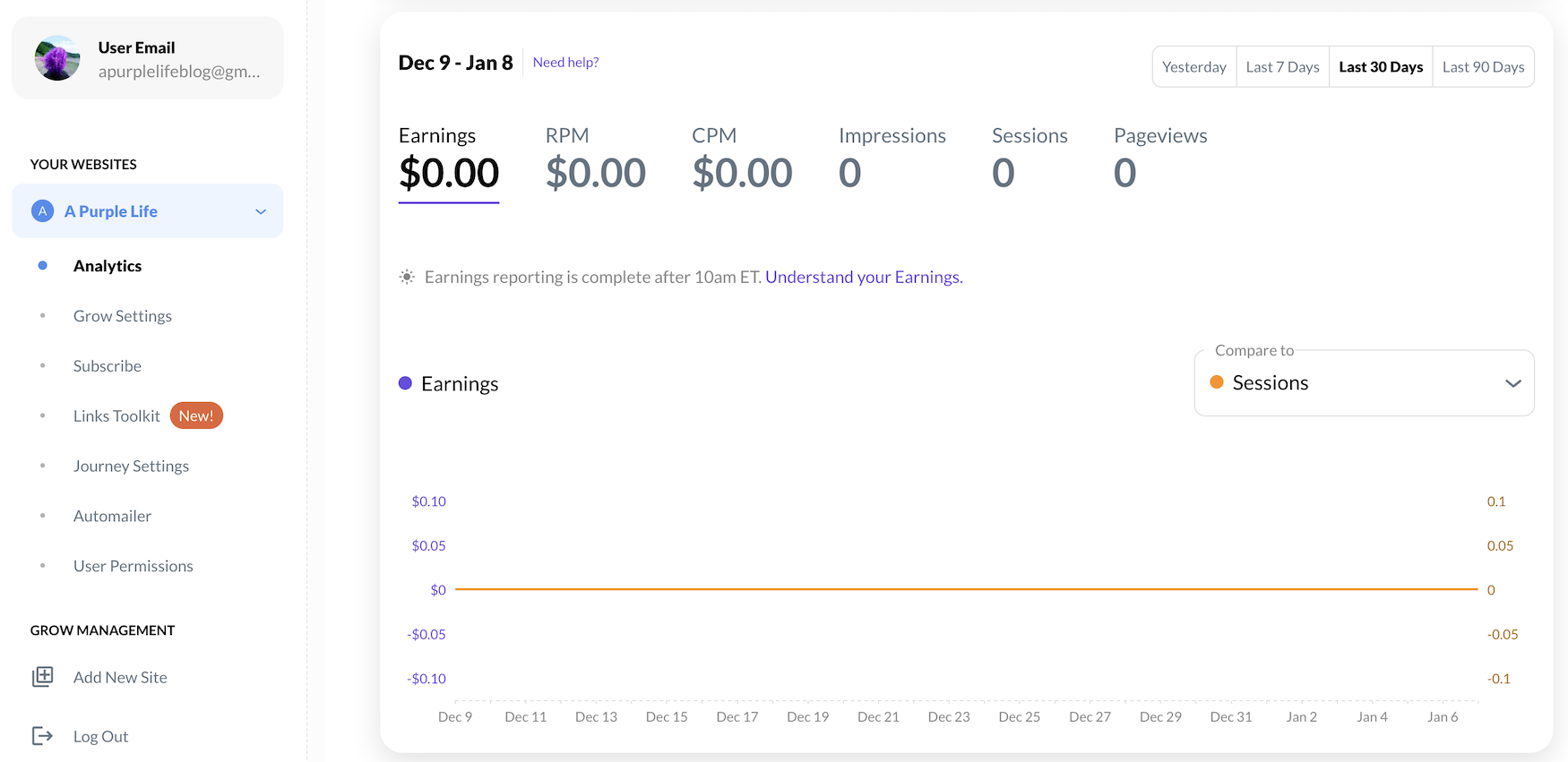
The main analytics page shows a date range that you can change and the data points like “earnings” listed above.
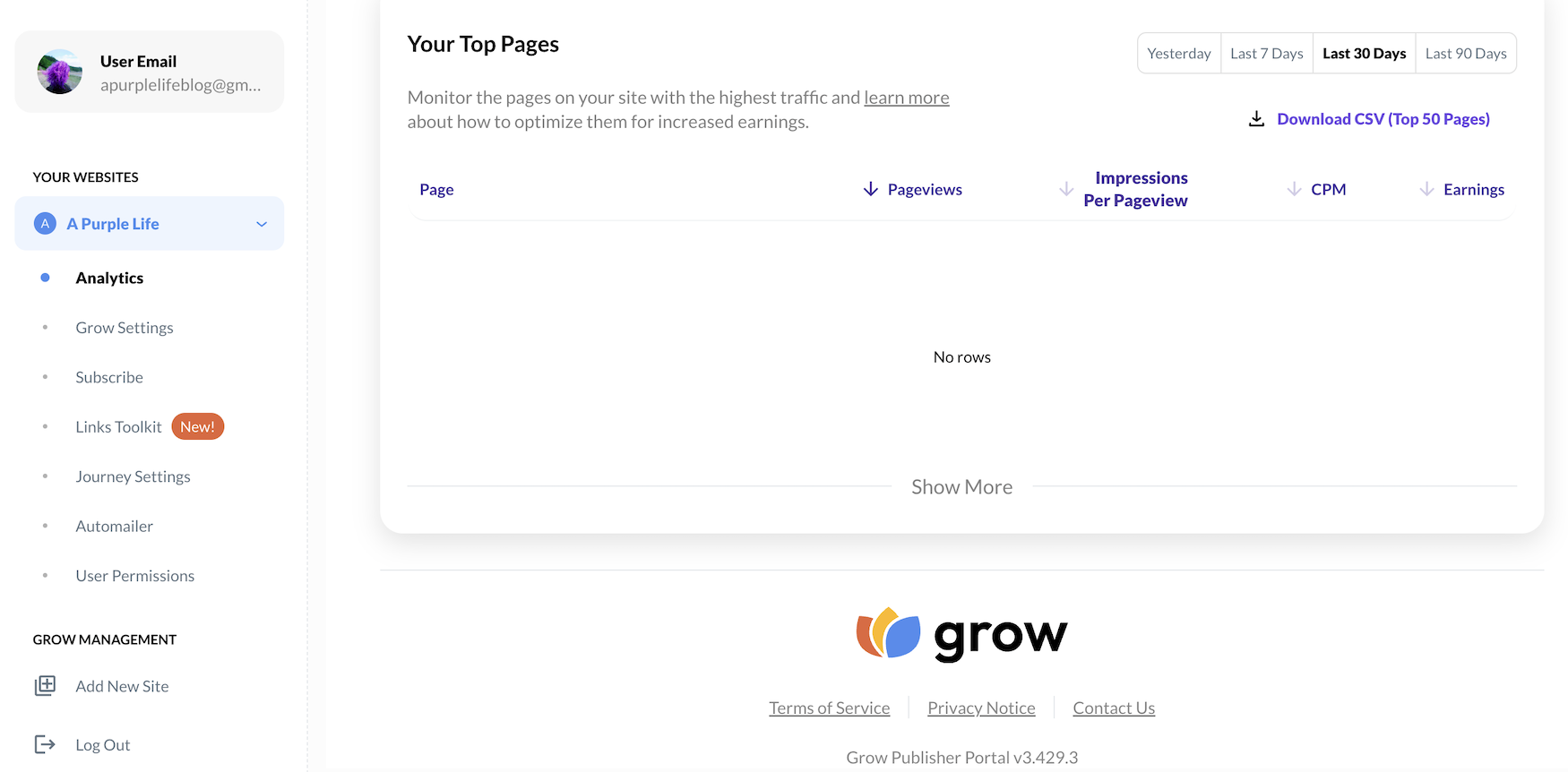
If you scroll down, there is a section that breaks down the pageviews and earnings per webpage. This amount of data is a little less than what I was provided with Monumetric, which had sections for things like earnings by device.
As a comparison, regular Mediavine provides even more data than Monumetric. I always prefer more data over less, but Journey did give me enough information to know what was going on.
The Numbers
This is supposed to be a finance blog so let’s dive into the dollars. And because I’m a nerd, I of course made some colorful charts to track this stuff 🙂 .
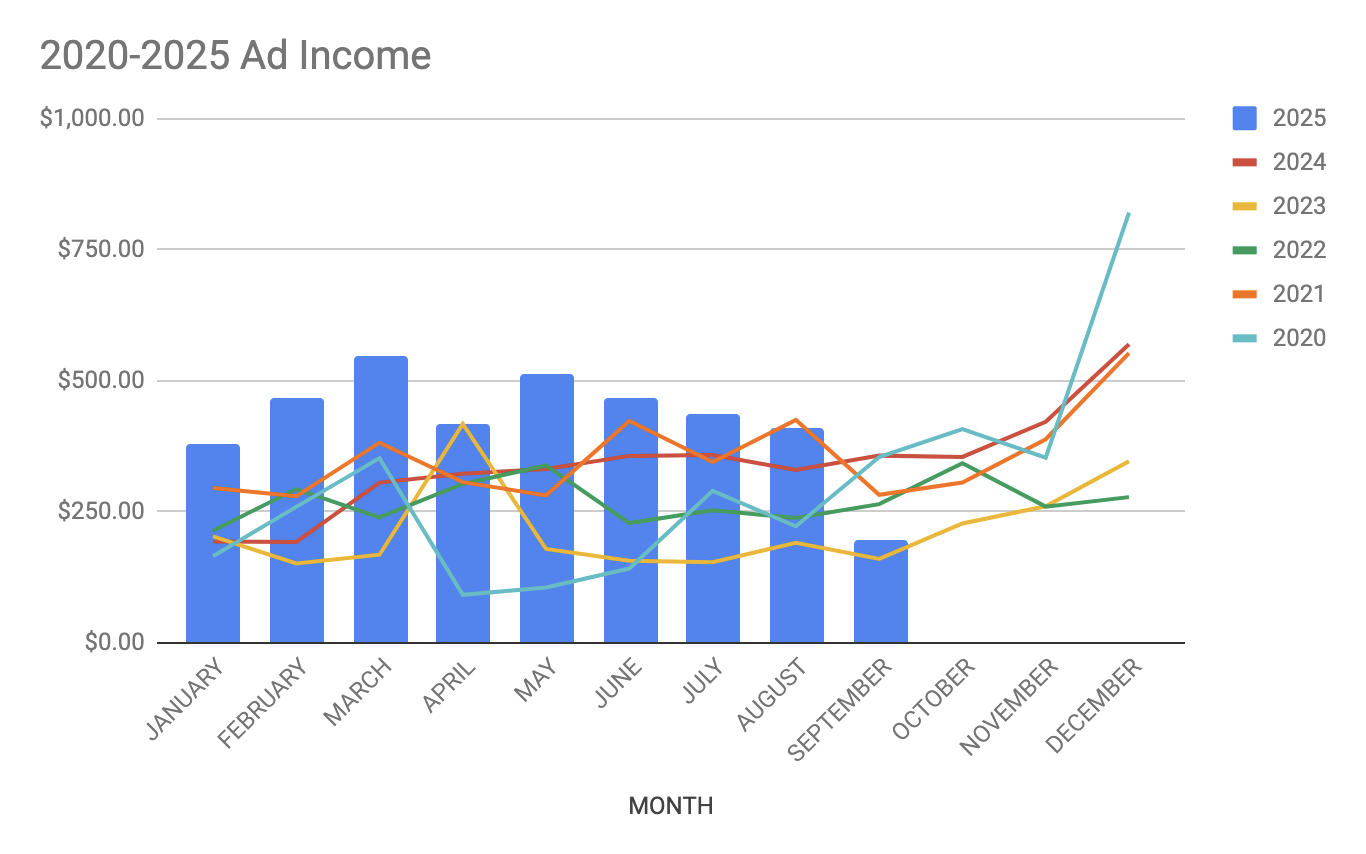
From 2020-2024 I was with Monumetric and tracked my monthly ad revenue with them. In January 2025 I joined Journey By Mediavine and made an average of $418.80/month. Here’s how the monthly revenues compared over time:
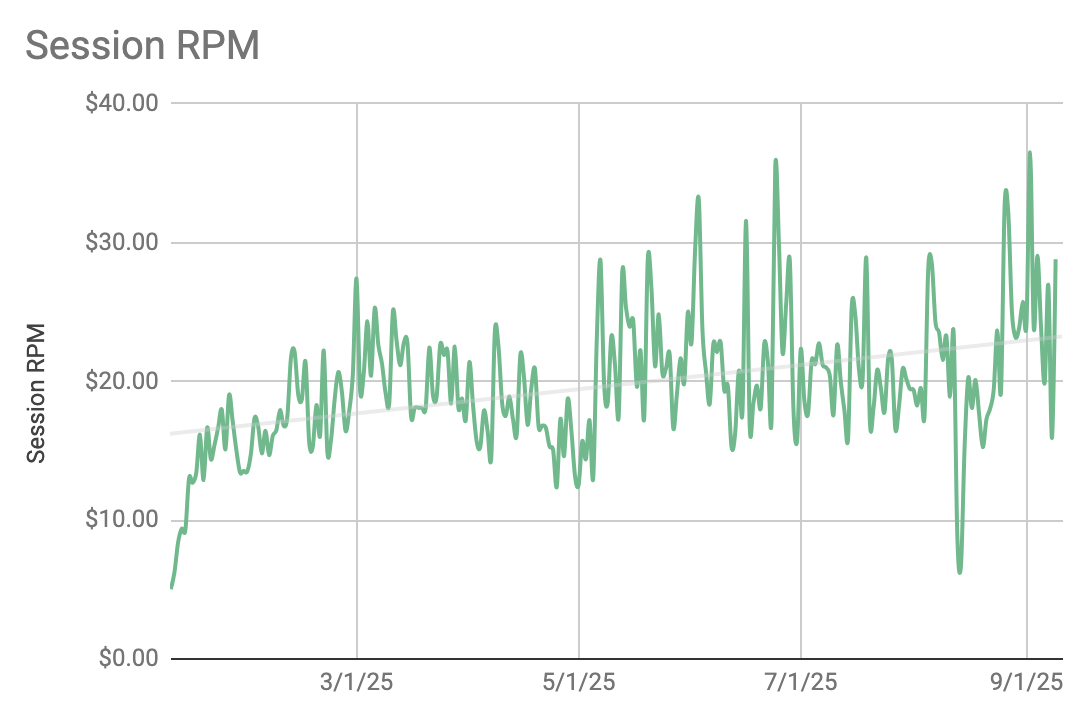
And these were my session RPMs across both ad networks with Journey’s in blue having an average session RPM of $19.22:
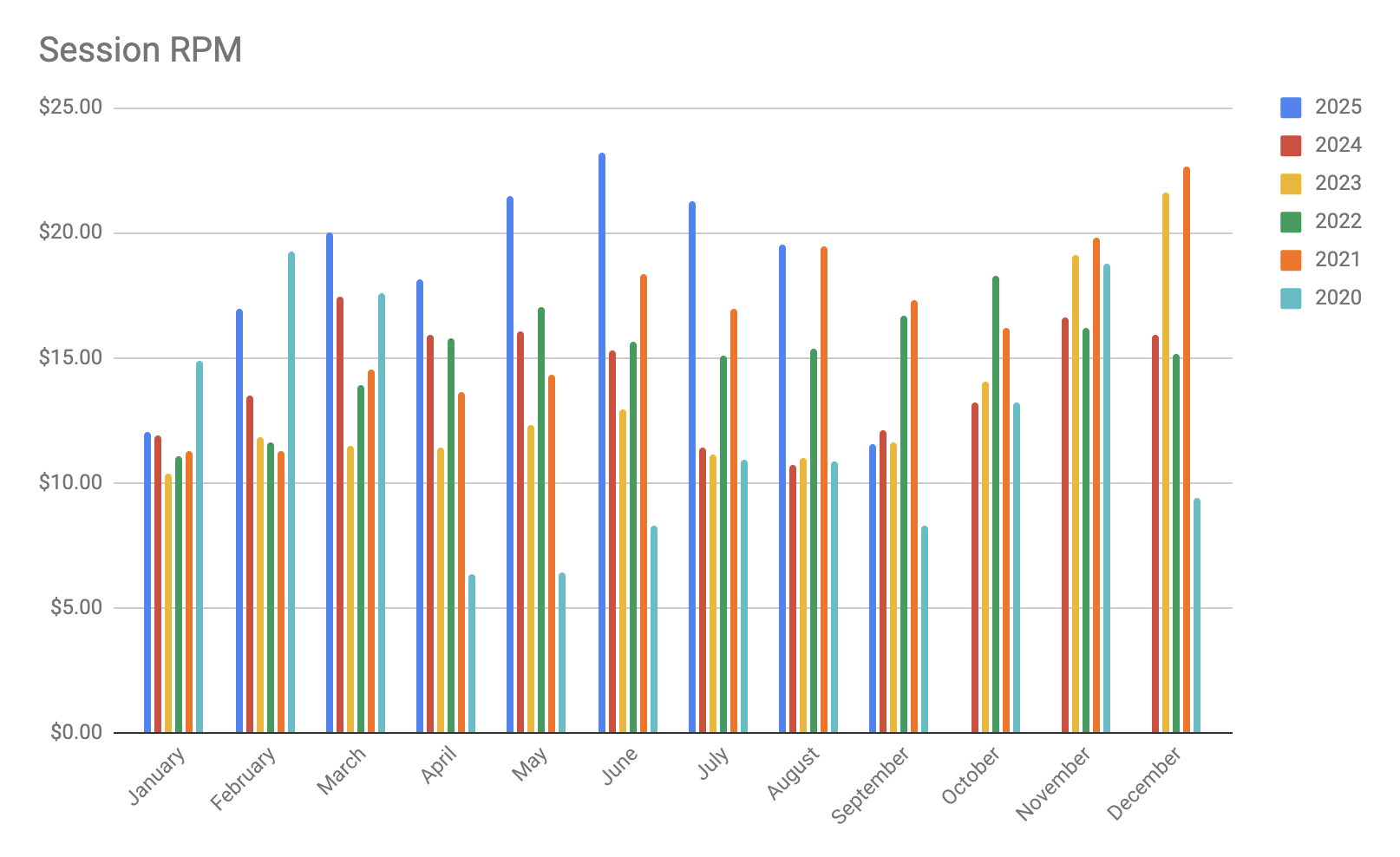
I started with Journey in January, which is when the lowest RPMs of the year happen. However, after that first month, my RPMs increased quickly as you can see, and was on an upward trajectory per the grey trendline:
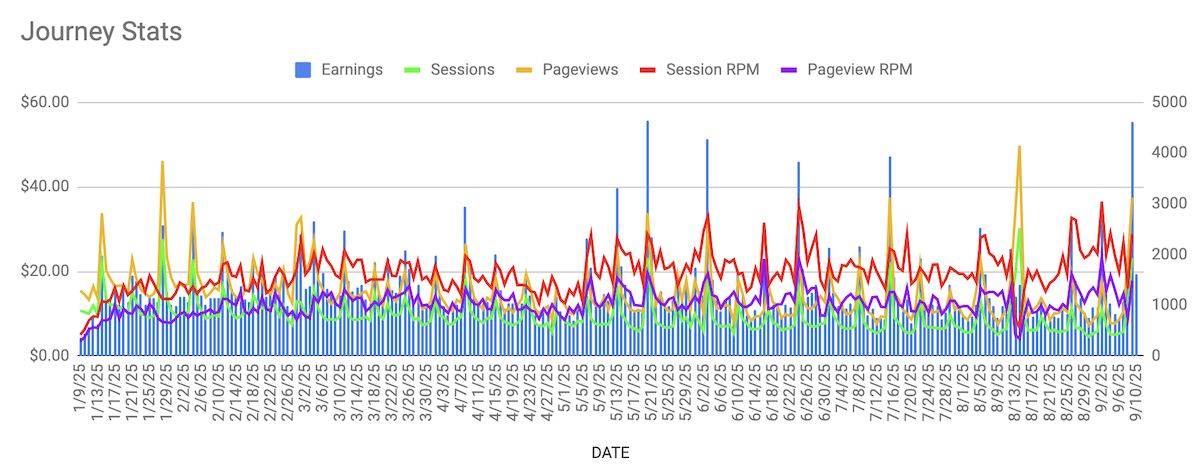
And here are the nitty gritty details for every day I was with Journey:
Customer Service
So Journey works a little differently than Monumetric or regular Mediavine. With Monumetric, I would email their publisher group and a human would get back to me about my specific question.
With Journey, they have a forum where people can post their questions and when I joined, a Journey employee would respond. What I liked about this was that you could see what other people had asked and usually find someone who had previously asked and answered the question you were wondering, saving you and the Journey employees time.
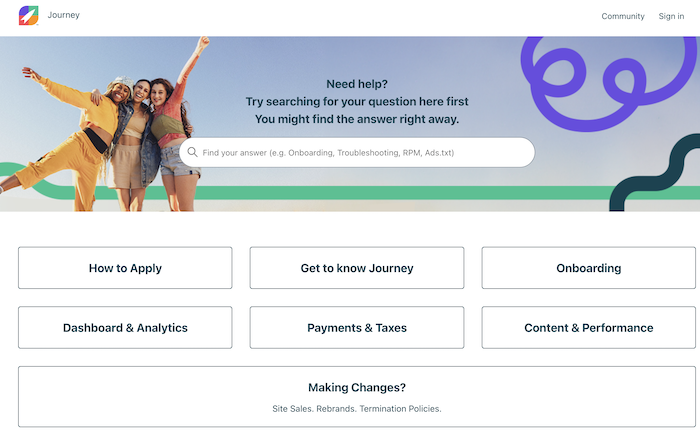
Journey also has extensive documentation showing how to troubleshoot a lot of issues step-by-step which I absolutely loved. This is part of what made my onboarding experience so smooth – they have everything you need easily available to find.
In February I had my first customer service experience with Journey. They added the option to connect your Google Analytics to Grow instead of the plugin just grabbing analytics directly from your website.
However, when I tried to connect my Google Analytics the option in the Journey Dashboard was greyed out. So I reached out to Journey via their Community forum and posted this message.
I was very surprised and impressed that they got back to me immediately in the forum and I received an email telling me they had replied! That was great since I didn’t have to keep checking the message to see if there had been any responses.
Anyway, it seems like your Google Analytics has to be in the New York Eastern Time Zone to work and mine was in the Los Angeles Pacific Time Zone. I had assumed it would be in ET because I started writing this blog when I lived in NYC, but that wasn’t the case.
I updated that time zone easily in my Google Analytics Admin page, but it took a few hours to go into effect. After it did, everything worked as it should and I was able to properly update my JourneyDashboard to include my Google Analytics data. I also later saw that Journey wrote a whole post about this issue to help other people avoid it – awesome!
A Self-Supported Update
However, in the community forums around May, I started seeing this message posted below new community questions:
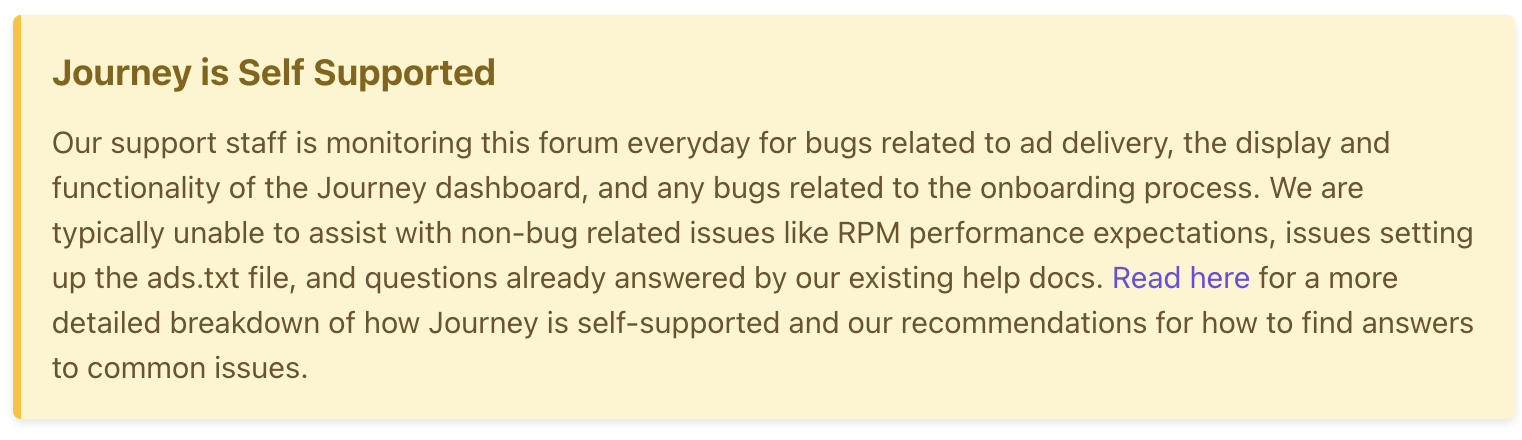
I also started seeing a decrease in Journey employees answering forum questions. However, I did see community members jumping in to help and I did that myself a few times.
At this point it had been over a year since Journey launched, so maybe they only intended to reply directly to people until everything was up and running for a bit and most issues had been discovered and resolved. I have no idea, but this is a change in the customer service structure so I wanted to point it out.
The 8 Month Review
So that was my 8 month experience with Journey By Mediavine! I had a wonderful experience that was lightyears ahead of my time with Monumetric.
I’m very impressed with the amount of documentation Journey has created in a short amount of time. It’s already way more than Monumetric, which has been around since 2012.
I love that Journey’s ads didn’t mess up the readability of my site and that I was able to change the ad density and see a range of information on their dashboard.
Customer service wise, I was very impressed with how quickly they answered questions in the forum when I asked. It was possibly faster than the response time I would get via email with Monumetric.
However, as I mentioned, the forum is now self-supported. So far that change hasn’t seemed to be an issue since all of the questions I’ve had have been answered in previous threads, but that could be a negative for some people.
The only problem I had with Journey was that their Grow Plugin automatically pushed new ‘features’ to my site without permission, which I quickly realized and turned off after installing the plugin. Ideally I think that should not happen and that the Grow Plugin should require you to turn on any feature that it has instead of pushing them live automatically.
However, if the Grow Plugin continues to auto-publish new things to websites, I would recommend anyone joining Journey to set aside some time right after installing Grow to turn all the settings you don’t want off. In the grand scheme of things that’s not a major issue, but I wanted to point it out.
Overall I have had a fantastic time with Journey By Mediavine. I think it’s a great ad network for blogs with 10,000 sessions and was a lot easier to use and had way less glitchy ads than my last network.
Despite the limitations of Journey’s dashboard, I actually feel more in control of my site because I’m no longer constantly fighting with a company who keeps trying to sneak additional ads onto my website. My time with Journey has been shockingly smooth and enjoyable and I was planning on staying with them indefinitely.
Conclusion
You might have noticed that in the last few weeks, the logo on my site’s ads has changed from the Journey “rocketship” to the “M” of regular Mediavine. A few weeks ago the Mediavine team reached out to me saying that I was ready to “graduate” to regular Mediavine.
I was surprised by this because I only had about half of their new session requirements that month, but I went along with it to see what would happen. And shockingly my lack of sessions didn’t seem to be a problem.
I don’t know if being in Journey for almost a year ended up being kind of a “pre-qualification” program that helps you get into Mediavine despite having less than their session requirements or what. But I’m very surprised to say that I am now part of an ad network that my newbie blogger heart had always aspired to and had later given up on because of their high traffic requirements.
So I’m with Mediavine now 🙂 . I’ll keep y’all posted on how it goes with a 1 year update down the road in case that’s helpful for anyone else.
In the meantime, I hope this thorough review of Journey By Mediavine is helpful for anyone thinking about joining their ad network. It’s a fantastic choice that I wish existed when I was first thinking about putting ads on my website.
This is news to me!! I’m so glad you wrote about it, as I also gave up on Mediavine after they dropped me and figured that was it. I’ve been unmonetized for years now but it would be nice to cover the costs!
Haha I’m happy it was helpful!
Very interesting to see how this all works under the hood! Always enjoy your blog posts, keep on doing your thing 🙂
I’m glad it was interesting and that you enjoy the blog! And thank you – will do 🙂 .
This was really helpful to me. Thank you so much much for sharing in detail. I have been with Monumetric for years and for me luckily, their team was always helpful and managed everything and yes I made a decent ad revenue before Google HCU happened but lately, I wasn’t having a good ad experiences. Too many blank spaces, large empty spaces, loading times, video ads, header, footer, and I was like, yes its good to have ad money but not at the cost of my reader leaving my page. So a few days back I emailed them that I have decided to move forward without the ads. The journey by mediavine sounds niche from your experience although I am not sure if they’ll accept me as I am from India and they prefer US based traffic. But seeing the ads from Journey on your site definitely looks a lot better than Monumetric been implementing recently. Thanks again for your experience.
I’m so happy to hear it was helpful and that you had a good experience with Monumetric. And yeah feel free to check out Journey – in their forums I’ve seen several people in India with blogs that are in the program so I imagine it’s worth a shot to apply 🙂 . Good luck!