
Our world keeps changing and in some ways that’s a good thing. I continue to be amazed by new free tools I find online that help make my travel easier. Some of these have launched recently and some have been around for a while and I just had no idea.
I’ve talked in the past about travel tools that help me live my previous full-time nomad life in the posts below:
- My Favorite Travel Tools Of 2024
- My Favorite Nomad Travel Tools Of 2023
- My Favorite Nomad Travel Tools Of 2022
- How I Choose And Book My Flights: A Peek Inside A Full-Time Nomad’s Travel Planner
- My Packing List As A 5 Year, Full-Time Nomad
- How I Choose Great Airbnb Stays: A Peek Inside A Full-Time Nomad’s Travel Planner
And every year I learn about new ones, so today I’m here to talk about my favorite tools I’ve discovered in 2025 and 2026. Since I have done several of these posts before, I’ll do a quick list of the tools I love that I’ve previously covered, separated by category:
Flights
- Direct Flights Between Airports: FlightsFrom
Trains
Cruises
- Realtime Cruise Tracker:Cruise Mapper
Transportation
- All Transit Options Between Two Locations: Rome2Rio
Hotels
Weather & Time
- My Weather App: Today Weather
- Climate Planning: WeatherSpark
- Trip Weather Planning: Where And When
- Daylight Planning: Time and Date
- Time Zones: WorldTimeBuddy
Travel
- City Overview: Nomad List
- Tipping Etiquette: Who To Tip
- Schengen Visa Calculator: Visa Calculator
- Covid Travel Requirements: Sherpa
Nomad Needs
- Packing Cubes: Eagle Creek Pack-it Specter Compression Cubes
- Travel Adapter: BESTEK Universal Travel Adapter
- Mini Travel Adapter: EPICKA Universal Travel Adapter
- Cord Organization: Avantree Cord Organizers
- International Phone Service: Google Fi
- No ATM Fee Debit Card: Charles Schwab Investor Checking Account
- Deliveries While Traveling: Amazon Lockers
- Glasses: Zenni Optical
- Period Cup: Saalt
- Free Noise Machine App: White Noise Lite
Support
- Speak With A Human Company Rep ASAP: GetHuman
Now that the recap is out of the way, let’s get into my latest favorite travel tools!
Travel
TripIt
After TripCase (the app I used to organize my travel for 12 years) sadly bit the dust, I went searching for my next travel organizer. If you’re interested in my full search, I wrote about that in the post below:
And if you’d prefer a summary, here you go 🙂 . I’ve been using TripIt for over a year now to organize my (at times very confusing) travel itineraries, and it hasn’t missed a beat. Here are a few things I love about it:
One Email: Oh thank goodness 🙂 . Just like TripCase, TripIt gives you one email to send all of your confirmations to: “[email protected].” It then sends you an email when it’s been imported just like TripCase.
Offline Availability: TripIt is available offline with their free version – what a novel concept 🙂 .
At-A-Glance: This app has had a redesign since I originally tried it two years ago and it’s great at showing all of the info you need upfront on your mobile device and on your desktop. It’s even clear with time zones on the summary page and you can click through for more details on the go.
Check In/Out Times: TripIt shows check in and out times without me having to do anything.
Trip Picture: One thing that often tripped up TripCase was how they pulled photos of my destination. At times it was blank because it got confused with the location, but so far with TripIt, that hasn’t been a problem even with 12 months of travel itineraries. I also noticed that if you’re going somewhere so small that TripIt doesn’t have a picture of that location logged, you can just tell it what country or city to pull a picture from. Nice!
Additional Features: TripIt has features that I never saw on TripCase that I appreciate such as: Neighborhood Safety Scores based on your accommodation address, the option to view nearby restaurants, hospitals, cafes etc based on the same info, and even road trip help. TripIt also shows a map of your activities if you click on the notebook in the mobile app.
Thrifty Traveler
I’ve been subscribed to Thrifty Traveler’s free newsletter for a while now and I’ve been really enjoying it. I usually unsubscribe from these types of things quickly if I see that they aren’t very helpful and just clutter up my email inbox, but that wasn’t the case with this newsletter.
Instead, it’s saved me a fair bit of time by suggesting alternate travel solutions when things aren’t working as they should, such as Touchless ID and Mobile Passport Control, which I’ll discuss more below. Thrifty Traveler seems to have their finger on the pulse of the travel industry, which is something that seriously affects my life since I’m often traveling, but isn’t something I want to scour the news about on a daily basis. So I find their free newsletter very helpful.
I was also offered a free 2 week trial of their premium subscription, which is currently $60/year. I usually decline these kinds of invites, but I was curious about what kind of travel tips and flight deals they share, so I said yes.
It was cool to see the flight deals for cash and points that they find, but since I plan my travels so far in advance, it wasn’t actionable for me. But if Thrifty Traveler sounds like something you would enjoy, feel free to sign up for their free newsletter and if you want their premium features, you can use promo code APURPLELIFE to get $20 off your first year if that’s helpful.
Flights
Gate Checking Bags (For Free)
Here’s a pro tip I’ve been using a lot lately. If you don’t feel like putting your carry on in the overhead bin, you can always ask the flight’s gate agent “Are you gate checking bags today?” and every single time I’ve asked, they said yes and I get to check my bag onto my flight for free – instead of paying $35-45 a bag domestically or $75+ internationally.
My beloved TravelPro Platinum Elite 29″ Spinner is small enough I can just use it as a carry on, but if I would prefer to be hands free, it doesn’t hurt to ask 🙂 . And in many instances of full flights, airline employees are trying to get people to gate check bags in advance because they won’t all fit on the plane. In these instances they often even let people who gate check bags board in an earlier boarding group. I love it 🙂 .
An Earlier Flight (For Free)
Since my Mom used to work for an airline, I’m not always sure what’s normal traveler knowledge and what’s more insider knowledge. I mentioned to a friend that I got on an earlier flight for free and she didn’t know that was an option, so I’m mentioning it here in case this isn’t common knowledge.
I arrived at the airport for an American Airlines flight very early since I wasn’t sure what the security line situation would be. When I looked at the TV that showed all the gates for flights, I saw that there was another flight to my destination that was leaving soon and was next to my regular gate.
So I popped over to the earlier flight and just told them I was on the later flight and asked if they had any free space. They said yes and told me it would be a middle seat though – I said that was ok and I took it.
I was then printed a new boarding pass and I saw that my seat assignment put me in Main Cabin Extra, the section of an American Airlines plane that has extra legroom and free drinks (the latter of which I didn’t take advantage of because it was an early morning flight). All that to say – I got an earlier flight and more legroom for no extra dollars 🙂 . It never hurts to ask.
Multi-City Flights (For Cheaper)
In my 5 years being a full-time nomad, I mostly took one-way flights since I didn’t have a homebase to go back to. However, in my travel research I discovered a few years ago that at times doing a “Multi-City” flight is cheaper than multiple one-way flights.
- I Got A Homebase! (But Will Still Travel 1/3 Of The Year)
- Longterm Travel With A Homebase Feels Worse Than Being A Full-Time Nomad
I had previously ignored this “Multi-City” search option on sites like Google Flights, Delta.com or IcelandAir.com because I didn’t see the point of it, but now I know 🙂 . I’ve now used this ‘trick’ to book several wild itineraries for a fraction of their one-way flight costs, such as the below IcelandAir extravaganza.
FlightAware
I’ve mentioned how much I love the site FlightAware before, but I’ve been using it in a bit of a different way lately that I’d like to discuss. However, as background: FlightAware is an awesome tool that lets you see everything about your upcoming flight.
It tells me where the plane I’m flying is at that moment, if it’s delayed, and what gate it’s going to. This gives me a heads up if the plane departed its last destination late, or if there’s bad weather along the way, or if the incoming plane is heading to another terminal so I might be getting a gate change announcement soon.
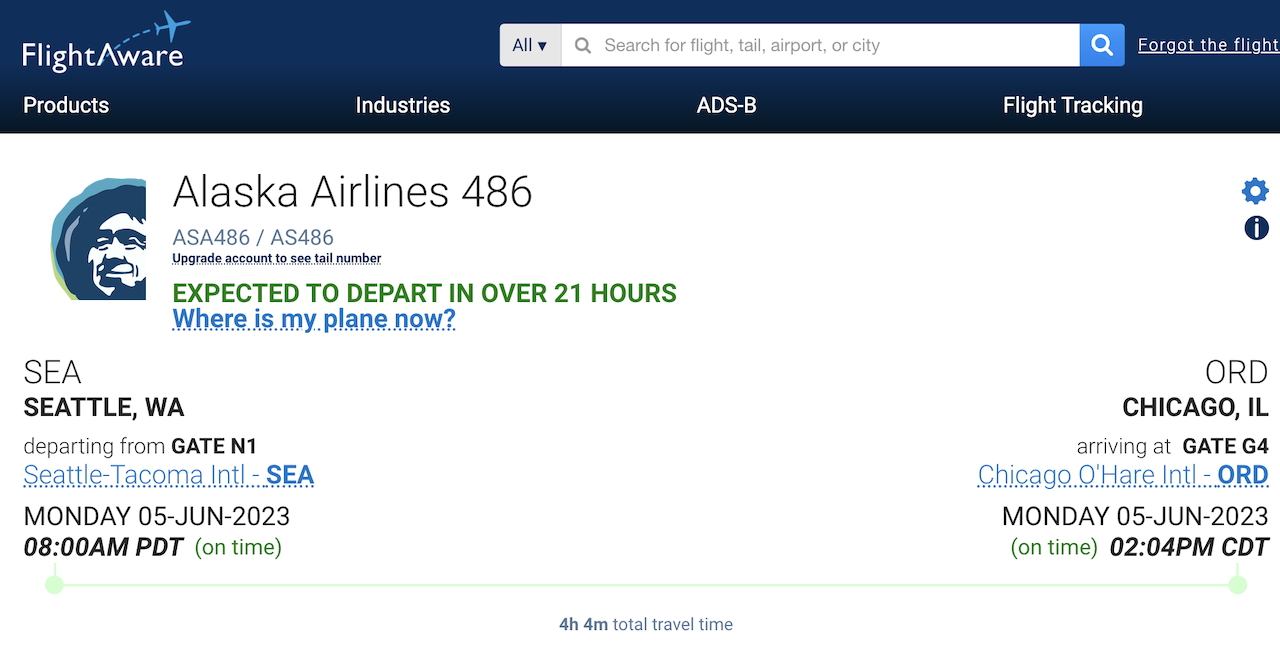
I learned about the latter through the amazing “Where is My Plane Now?” feature. I love this feature because you can click it over and over until you see where plane for tomorrow, for example, is right at this moment! I can then look at weather issues in that area or see points of failure that might lead to my flight being delayed, cancelled or assigned to another aircraft.
This knowledge allows for some advanced contingency planning, which I love. FlightAware also has maps of real-time flight traffic if that’s something you’re into.

SeatMaps
When booking a flight, I used to always check SeatGuru before booking my seat to make sure it didn’t have anything strange going on like a missing window or limited recline. Luckily some airlines have started warning about the former on their seat booking page, but not all of them 🙂 .
Sadly SeatGuru is no more so I went looking for an alternative about a year ago and found SeatMaps. It works basically the same way, but has a less wonky search function than SeatGuru did (Nice!) So I can search by route or flight number to see what kind of plane I’ll be flying and choose my ideal seat accordingly.
Airports
TSA Pre-Check Touchless ID
Once again Thrifty Traveler’s free newsletter has taught me a travel hack. Apparently some airports and airlines now have an additional TSA PreCheck lane called Touchless ID, which is even faster.
And since I was traveling this month when security lines were reaching record lengths, I was willing to look into any possibility to not feel like I live in an airport.
So according to Thrifty Traveler, TSA PreCheck Touchless ID “comes with all the usual benefits of PreCheck – you get to keep your shoes, light jackets, and belts on, and you don’t have to worry about taking liquids and electronics out of your bag – it uses facial recognition to identify pre-screened travelers, saving you from having to hand your ID over to an agent before sending your stuff through the screening area.
The real kicker? Few people even know this option exists, and the lines are typically much shorter than those for regular security or PreCheck.“
So my curiosity was peaked. The Thrify Traveler article about Touchless ID lists what airlines and airports have this option and Phoenix Airport (where I was going to be flying back out of) is on the list. So I decided to try it and I was very impressed.
Before my flight, I had to go into my American Airlines app and opt in for Touchless ID by making sure my passport was logged with their airline. Then when I was flying out of Phoenix, there was a regular TSA PreCheck line and next to it was a TSA PreCheck Touchless ID line.
I went through the latter and when I got to the front of the line I was told to stand at a certain spot and they took my picture – just like regular PreCheck these days, but I didn’t have to hand over my ID or my boarding pass and I was let through in less than 5 seconds. It was wild and I’ll definitely keep that option in mind when I’m flying through a participating airport in the future.
Also my Mom has used Touchless ID in Atlanta and said that when you arrive at that airport, there’s a section for Touchless ID where you can skip the regular check in line and instead give them your bag curbside. Cool!
Mobile Passport Control (MPC)
When I was flying back from México, Global Entry was idiotically closed because of a new record-breaking government shutdown. The decision to close Global Entry, which is not paid for by tax payers but by the membership fees and is a mostly automated program that saves everyone involved time, is so counterproductive it boggles my mind.
But anyway, when I was on my plane back to the US (woohoo plane Wifi!), my Mom suggested trying an app called Mobile Passport Control (MPC). I hadn’t heard of it before but I was willing to try anything so we didn’t get caught in a long immigration line and miss our connecting flight home. Luckily I was able to download the MPC app over Delta’s Wifi.
I then filled in information about myself, my Partner and our travel plans. I also had to take a selfie of each of us, which was fun to try to do since this was all on my phone and my Partner sits behind me on planes (we’re weird and that works for us).
Luckily, when we landed at ATL airport, the immigration lines were not that long. They were however not labeled clearly so we got into what we thought was the MPC line only to discover it was a regular line. We still didn’t wait more than a few minutes so it wasn’t a big deal.
However, it’s good to know this app exists and can help expedite immigration lines. I’ll be keeping that in my back pocket in case this government continues to do idiotic things to travelers as apparent political leverage during their toddler-style tantrum.
SleepingInAirports
The website SleepingInAirports continues to be very helpful during my travels. It’s a comprehensive site that has information on every airport in the world that includes things like the Wifi name (so you don’t accidentally join a scammer’s fake one instead), the best places to relax in a specific airport during a long layover, where you can go to get water or charge your devices and even what lounges in the airport are available and have day pass options you can buy.
I used it to make my 7 hour overnight layover in Singapore last year more enjoyable and it also helped when I was waiting around JFK this month to take a 1am flight to Ecuador. I love it so much 🙂 .
Calendars & Time
Global Holidays on Google Calendar
A reader recommended a while ago that I add holiday calendars for the different countries I visit to my Google Calendar. This tool could have helped me avoid a mini-catastrophe when a holiday I wasn’t aware of happened on a day we needed to find an open pharmacy to administer a COVID test to allow us to fly home. It was a great idea and also a Google Calendar feature that I didn’t know existed.
However, since I have had the holiday calendar of every country I’m visiting show on my calendar so I can plan accordingly, no similar mini-catastrophe has happened since. Having this info readily at hand has also helped me easily plan around a country’s holidays and not travel on them if possible, like I did in the post below.
Here’s how you add these calendars per Google:
- On your computer, open Google Calendar.
- At the top right, click Settings
> Settings.
- On the left panel, click Add calendar > Browse calendars of interest.
- Under “Regional holidays,” click Browse all.
- To add or remove a calendar, check the box next to it.
Global Daylight Savings Time
Different countries either don’t have Daylight Savings Time (smart) or do it at a different time than the US. This is important to know so I’m not in another country, didn’t realize DST has happened, and then mess up my video call plans with friends in other countries because I didn’t realize DST happened (ask me how I know 🙂 ). So I use this DST page of my beloved Time And Date website to make sure I know when or if DST is happening in a country I’m visiting.
Organization
Google Keep
I mentioned about 4 years ago that I had started using Google Keep to organize my random thoughts and I’ve been using it every day since. It’s also super convenient because Keep automatically syncs between my computer and phone so I’m always up-to-date and can access it easily wherever – I can even access previously saved notes while I’m offline.
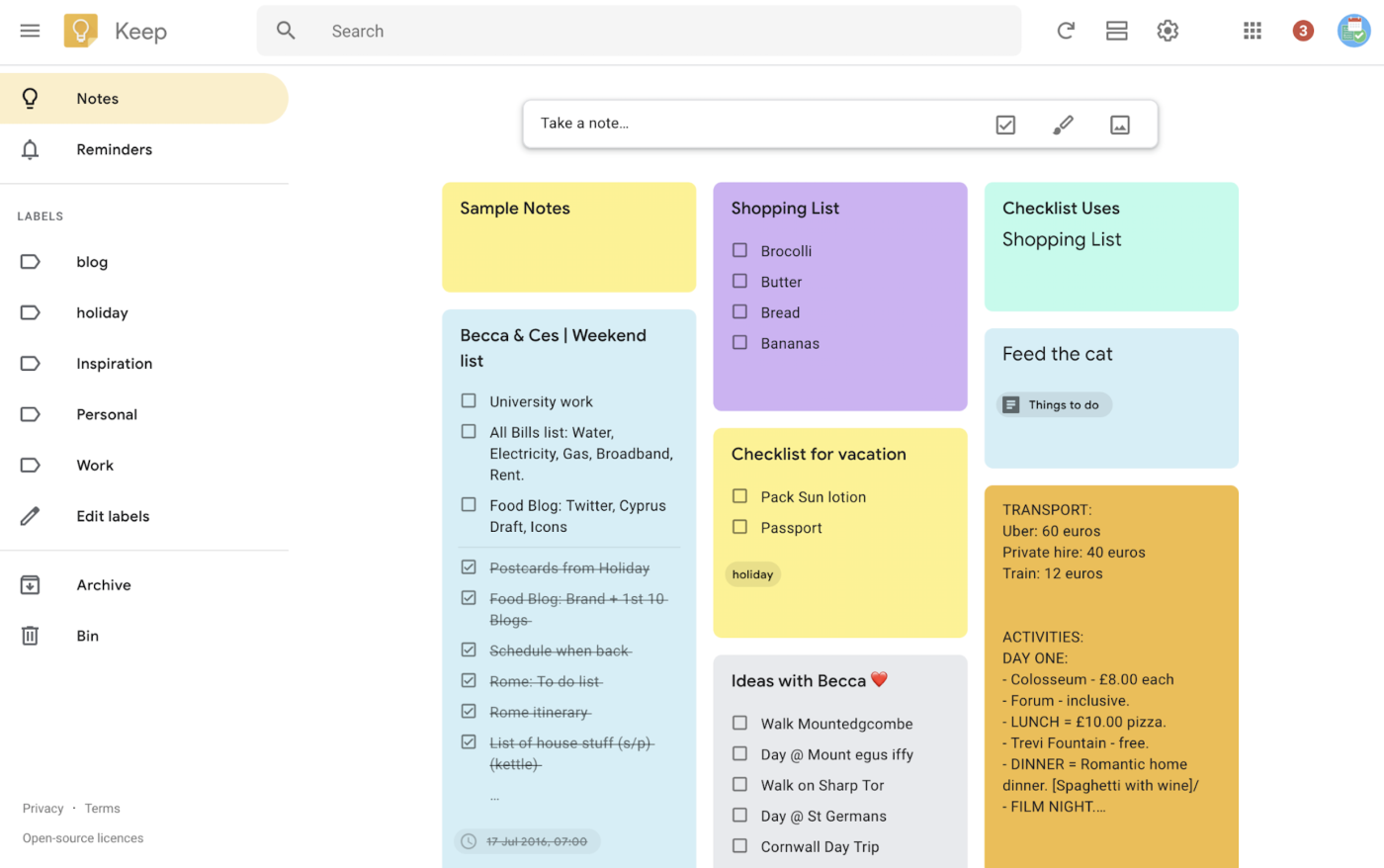
I also really enjoy how Keep is laid out like digital post it notes with colors and patterns you can choose to make it easily scannable. And I enjoy how you can Pin your most important notes so they’re always at the top of the screen. In addition, I can use their Reminders settings to have Keep literally remind me about a note that I need to do something with at the exact moment I need to do it.
Google Keep allows for a lot more text and overall context than Google Calendar Reminders and just aesthetic-wise, the Keep app patterns also change while I switch to Dark Mode, which for some reason endears me further. And lately I’ve found Google Keep even more helpful because they introduced Version History!
Now if I change something in my really long note about my current knitting project or think I made a mistake counting my rows for example, I can just download the previous version – or previous 5 versions if I’m feeling neurotic to make sure I’m on the correct track. I love it so much 🙂 .
Conclusion
And those are my favorite nomad tools that I’ve discovered lately! They’ve made my travel life more efficient and awesome, and I hope they’re helpful as you embark on your next adventure!